StateTree Integration
Documentation Unreal Engine AI StateTree
Author the enemy's shape as a graph: point the AI Config at a StateTree and patrol, investigate, fight and walk home become states you can see.
An enemy whose high-level behaviour is a graph you can read: patrol, investigate, fight, walk home. The combat underneath stays the same scoring and movement the plugin already runs.
Set it up
60 seconds- 1
Point the AI Config at the shipped tree
In the Content Browser open Settings and tick Show Plugin Content. Then open your enemy's Enemy AI Config and under Behavior set Default State Tree toStateTree_SEC_Core.EnemyConfig_Grunt▾BehaviorDefault State TreeNone▾One field. Empty runs the native combat loop, filled runs the graph. - 2
Play, and watch it fight
Press Play. The enemy stands idle until something registers as its target, then the Combat state takes over and runs the fight.RunSEC.Debug.Decision 1in the console to see the distance, angle, line of sight and threat the graph is deciding on, written above each enemy. - 3
Copy the tree into your own content
Right-clickStateTree_SEC_Core, Duplicate, and drop the copy in your project's Content folder. Repoint Default State Tree at the copy. DuplicateStateTree_RoleBehaviortoo and relink it inside your copy if you want to change the fight loop as well.Edits made to plugin content are overwritten by the next plugin update. - 4
Add a state of your own
Open your copy and press Add State. The plugin's nodes sit in the node picker under AI, spread across categories: AI | Decision, AI | Movement, AI | SoulslikeEnemyCombat, AI | Territory, AI | Awareness, AI | Actions.
The Combat branch enters only with a registered combat target and a combat role other than
SEC.Role.None. Miss either and the graph runs, the states select, and the enemy stands there. If the tree looks right and nothing happens, check the controller's focus actor first, then its current role. See Getting Started and Targeting.Which tree an enemy runs
Three answers, and the first one that holds wins:
| Source | Wins when |
|---|---|
| Default State Tree on the Enemy AI Config | It names an asset. This is the one to fill in. |
| Fallback State Tree on the StateTree component | The config named nothing, on a custom controller that carries the component itself. |
| The native combat loop | Neither named anything. No graph, combat still works. |
Details
Enemy AI Config
Behavior
Default State Tree
StateTree_SEC_Core
Decision Context Params
Aggression Level
1
Window Id Interval Seconds
1.0
LOS Trace Channel
Visibility
LOS Trace Complex
Empty Default State Tree runs the native combat loop. Decision Context Params feed Build Decision Context and the native brain.
The tree resolves at possession. Change the config at runtime without re-possessing the pawn and call Refresh Brain on the SEC Brain component to pick the change up; it tears the previous brain down before starting the new one. A tree that fails to start logs a warning and the native loop takes over.
The controller needs a SEC Combat Controller, an Action Evaluation, a Movement Evaluator and a SEC Brain component for the plugin nodes to find anything. Enemy Controller Base ships with all four plus threat, reaction and awareness. A custom controller needs the same set added by hand.
What the shipped tree does
StateTree_SEC_Core is the top level, under Showcase/AI/StateTree in plugin content. Its root tries five children in order, and the first whose enter conditions pass is the one that runs:| State | Runs |
|---|---|
| Combat | The fight. Links StateTree_RoleBehavior as a subtree and watches the leash while it runs. |
| Return Home | Walks the enemy back to its ground once the pawn sits outside its leash, held out of combat on the way. |
| Investigate | Walks to where the target was last perceived, stands there and looks around. |
| Patrol | Walks the territory route, post to post, waiting at each. |
| Idle | Stands still. The fall-through when nothing above selects. |
StateTree_RoleBehavior is the fight loop it links to. A Role state polls the target, builds the decision context and polls for an action, then branches to Move or Action, with a short jittered pause in Recovery before it polls again.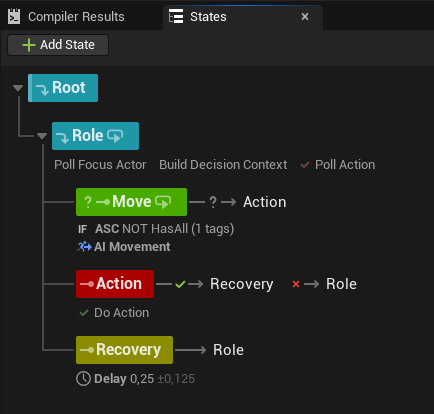
The graph's Recovery state is a pause in the tree and stops the enemy doing anything. Action Recovery Time on the AI Config holds offensive actions off while movement and reactions carry on. Use the graph state for a beat, the config value for attack spacing.
The fight, in four nodes
| Node | Does |
|---|---|
| Build Decision Context | Fills the distance, angle, line of sight, health, stamina, speed and tags the scoring reads. Ticks. |
| Poll Action | Scores the active Action Set and names a winner. Ticks. |
| Do Action | Runs that action and finishes when it ends. |
| AI Movement | Runs tactical positioning while the state is active. Ticks. |
Three bindings wire the loop:
- Bind Build Decision Context's Out Decision Context to Poll Action's In Decision Context.
- Bind Poll Action's Out Chosen Action to Do Action's In Chosen Action.
- Branch on Poll Action's Has Valid Action to pick between the Action state and the Move state.
Poll Action re-scores every Evaluation Cooldown seconds (0.1 by default) and skips while an action is running, so the winner cannot change mid-swing. Do Action waits for the action to end and then finishes, succeeding or failing with it.
Keep the state holding AI Movement in a running state through the fight. The task drives the pawn on tick, so a state the graph enters and leaves each frame moves nothing.
The rest of the nodes
Most of these bind their AI Controller pin from the graph context, so they need no wiring.
Target and role
| Node | Does |
|---|---|
| Poll Focus Actor | Outputs Focus Actor and Has Target. Bind Has Target on a combat state's enter conditions. |
| Poll Combat Role | Outputs Current Role and fires On Role Changed. See Combat Roles. |
| ASC Has Tag | Condition on the pawn's gameplay tags. Takes Tags To Check, a Check Type of Has Any or Has All, and Invert Result. Binds the Pawn pin rather than the controller. |
Awareness
| Node | Does |
|---|---|
| Awareness State At Least | Condition. Passes when the target has reached Min State (Detected by default). The order runs Unknown, Forgotten, Suspicious, Lost, Detected. |
| Poll Last Known Location | Outputs Last Known Location, Age Seconds, Valid and Resolved Target. Feed the location into an AI Move To. |
Both take an optional Target. Leave it unbound and the enemy's most-aware target answers, which lets one Investigate state serve a noise and a target that slipped out of sight. See Awareness.
Territory
| Node | Does |
|---|---|
| Territory Patrol | Walks the route: one leg, the post's wait, then the next post. Runs until the graph transitions out. |
| Territory Investigate | Walks to the spot on its Location pin and stands there for Look Around Time (3 seconds), then succeeds. |
| Return To Territory | Walks the pawn back to its home post, or takes the ground under its feet when no route reaches home. |
| Monitor Combat Leash | Tracks time spent outside the leash during one Combat activation and latches Leash Broken when the grace window runs out. |
| Hold Out Of Combat | Takes the enemy out of the fight while the state runs. Block Actions is on, Leave Coordination is off. |
| Territory Owns Ground | Condition: the enemy has a post it can reach, or a spot it took. |
| Pawn On Its Ground | Condition: the pawn stands on the one spot it holds. Invert it into Return To Territory. |
| Pawn Outside Leash | Condition: the pawn has been dragged past its edge. |
| Target Outside Leash | Condition: the target stands past the edge. Bind Target, or it fails. |
| Target Eligible For Combat | Condition: the leash permits fighting this target. |
| Resting Behavior Is | Condition: branch a patroller against a sentry without a second graph. |
See Territory for posts, leash and resting behaviour.
Waiting for the enemy to finish
Four conditions that stop a transition cutting an animation in half. Each takes an Invert Result tick. Action Executing, Action Recovering and Reaction Executing read false when the controller carries no component to ask.
| Node | Passes while |
|---|---|
| Action Executing | An action is running. Invert it on a transition out of combat so the swing lands before the state changes. |
| Action Recovering | The breather after an action is still open. Fill it with a strafe or a taunt instead of a blank pause. |
| Actions Blocked | Something is holding offense shut: a running reaction, a stun, a scripted phase. It reads the Action Evaluation component's block and the pawn's SEC.Action.BlockActions tag on their own, so the tag still answers on a controller carrying no Action Evaluation component. |
| Reaction Executing | A parry, dodge or flinch is playing. Invert it next to Action Executing for "doing nothing at all". |
Debug it
SEC.Debug.Decision 1      // Distance, angle, sight, speed and threat above each enemy
SEC.Debug.Actions 1       // Cooldown list above each enemy
SEC.Debug.Scoring 1       // What the last poll scored, highest first
SEC.Debug.Territory 1     // Owned ground, current post and leash margin
SEC.Debug.Awareness 1     // Awareness state, meter and last-known age
SEC.Debug.All 1 turns every overlay on at once, and SEC.Debug.WatchPawn <name> narrows them to one enemy. Run it with no argument to list the pawns worth watching.For the graph itself, open the StateTree asset and use its Debugger tab, which records which states selected and which transitions fired.
Individual tasks carry a log tick of their own. Debug Log on Poll Action and Do Action records what was scored, picked and run. Debug Log Movement Results on AI Movement records every movement result it receives. Debug Log Patrol on Territory Patrol and Debug Log Investigate on Territory Investigate record each leg and arrival.
AdvancedThe graph runs but the enemy does nothing
- No focus actor. Nothing registered a combat target, so Combat selects and finds nothing to fight. This is the common one.
- AI Movement sits in a state the graph leaves each frame. It drives the pawn on tick and needs to stay resident.
- Do Action does not finish. The action's ability reaches no End Ability, so the task waits. A built-in 30 second safety ends it when the action authored no Ability Timeout of its own.
- Poll Action outputs nothing. No Action Set resolved, or the enemy's gates all refused.
SEC.Debug.Scoring 1names the refusal. - A territory state fails outright. Territory Patrol and Return To Territory fail when the controller has no Territory or Movement Evaluator component, so the graph falls through to the next state.
- The tree failed to start. The brain logs a warning and runs the native loop instead, which fights but has no patrol or investigate.
AdvancedWhat Build Decision Context fills in
The task resolves its tunables once on entering the state, from Decision Context Params on the AI Config, then refills the context each tick:
- Spatial: distance to the target, angle to it, and whether the line of sight trace on LOS Trace Channel reaches it.
- Self: health as a 0 to 1 fraction from the pawn's health vital (1.0 with no vital), stamina from its stamina vital (100 with none), speed from pawn velocity, and Aggression Level straight from the params.
- Target: a threat estimate from focus distance and facing, worked out here rather than read from the Threat Detection component.
- Tags: gameplay tags on the enemy and on its target, plus the world tags the server holds.
Health backed by a GAS attribute belongs in an Attribute Scorer on the action rather than in this context.
AdvancedReading the same numbers from Blueprint
Three nodes hand the decision context to a Blueprint: Get Decision Context (AI Controller), Get Decision Context (Pawn) which resolves the controller for you, and Resolve Decision Params for the config values behind it. The two Get Decision Context nodes answer on the server and return defaults off authority. Resolve Decision Params reads the config wherever it is called, falling back to the struct defaults when no config resolves.
A getter reports a zeroed window and seed rather than the brain's running pair. Read distance, angle, sight, health, threat and tags live; do not expect the score jitter to line up.
AdvancedKeeping sets in step from the graph
Sync Action Set and Sync Reaction Set poll the pawn's set components and apply what the current combat role resolves to. Sync Movement Profile reads the AI Config for the current role's profile and applies it to the Movement Evaluator.
The Combat Controller already pushes all three when the role changes, covering the equipped weapon's sets and the movement profile with it, so a controller built on Enemy Controller Base needs none of these tasks. Add them when a custom controller has no role-change events, or when the graph should own the timing.
UpdateActionSet (its name carries no spaces in the picker) sets one fixed Action Set on the enemy. The swap outlives the state, since leaving the state restores nothing: the set holds until a role sync, a Sync Action Set task or another UpdateActionSet replaces it. Use it for a boss phase swap or a debug state, rather than as the ordinary path.
AdvancedSwapping subtrees for enemy variants
When a tree is configured, the brain creates a StateTree component on the controller at runtime and hands it the asset. It resolves what to run in order: the controller's cached config, then a pawn that supplies its own config, then the component's own Fallback State Tree.
Details
Bot State Tree AI Component
AI|StateTree
Auto Initialize From Config
Fallback State Tree
None
SECBrainComponent creates this at runtime when Default State Tree is set. Custom controllers can add it manually.
Untick Auto Initialize From Config to start the tree yourself instead of at possession. A linked-state override registered against a gameplay tag swaps one subtree for another, which is how several enemies share a top-level tree and differ only in the fight loop.
AlternativeRunning the fight without a graph
Leave Default State Tree empty and the SEC Brain runs a native loop: build the context, move, poll and execute. Scoring, movement, reactions and execution behave the same in both modes, so combat needs no graph at all.
The native loop grows on its own as components are added. An Awareness component gives it an investigate phase. A Territory component gives it a resting phase, a walk home when a fight ends, and a leash that calls off a chase gone too far.
Evaluation Cooldown on the SEC Brain component sets how often it re-scores, 0.1 seconds by default, and Min Phase Duration (0.5 seconds) is the floor against phase flicker. Get Brain Phase reports Resting, Idle, Investigate or Combat, and On Brain Phase Changed fires on each switch.
Reach for a graph when the enemy needs structure the loop has no opinion about: boss phases, scripted openings, a search pattern of your own design.